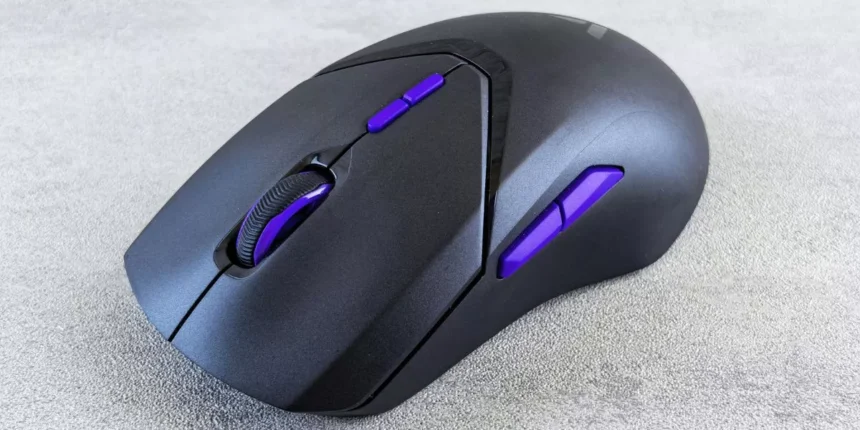
A concise roundup examines five standout gaming mice with RGB lighting for 2025, balancing sensor precision, customizable profiles and vivid illumination. Each pick reflects a different priority: compact control, budget wireless freedom, straightforward wired reliability, or lightweight programmability. The overview highlights key specs and who benefits most, then moves into specifics that clarify which model suits particular playstyles and setups.
- CORSAIR Harpoon PRO RGB Wired Gaming Mouse (12,000 DPI, 6 Programmable Buttons)
- Logitech G102 USB Light Sync Gaming Mouse (Black)
- coconut WM22 Gold Wireless Gaming Mouse (Rechargeable, RGB, 7-Button, Adjustable DPI up to 3200)
- AULA S31 Wired RGB Gaming Mouse (Ergonomic Right-Handed, 1200 DPI)
- Kreo Gaming Mouse with Programmable Buttons & RGB Lighting
- Factors to Consider When Choosing: 5 Gaming Mice With RGB Lighting In 2025
- Sensor Accuracy & DPI
- Polling Rate & Latency
- Customization & Software
- Build Quality & Ergonomics
- RGB Zones & Effects
- Weight & Balance Options
- Connectivity & Battery Life
- Conclusion
CORSAIR Harpoon PRO RGB Wired Gaming Mouse (12,000 DPI, 6 Programmable Buttons)

Best for budget-conscious FPS and MOBA players seeking a lightweight, customizable wired mouse, the CORSAIR Harpoon PRO RGB delivers a 12,000 DPI sensor, six programmable buttons, and onboard memory for lighting and DPI profiles, with deeper macro and RGB control available through Corsair iCUE. The Harpoon Pro is a 85 g, claw-friendly design with textured grips and scroll wheel, compatible with PC, Mac and consoles. Its non-braided cable and compact size may not suit large-palm users. Users praise sensor performance and value; recurring reports cite occasional double-clicking, button failures, and limited local RMA support—consider warranty before purchase.
Best For: Budget-conscious FPS and MOBA players who want a lightweight, claw-friendly wired mouse with solid sensor performance and customizable RGB/DPI via Corsair iCUE.
Pros:
- Lightweight 85 g design with a reliable 12,000 DPI sensor and good glide for FPS play.
- Six programmable buttons, onboard memory for lighting/DPI profiles, and deep customization through Corsair iCUE.
- Comfortable textured side grips and scroll wheel; good value for casual and competitive gaming on a budget.
Cons:
- Recurring user reports of double-clicking/chattering and occasional button failures affecting long-term reliability.
- Non-braided fixed cable and compact size may not suit large-palmed or palm-grip users.
- Full macro/button saving requires iCUE to remain resident, and local RMA/support can be limited in some regions.
Logitech G102 USB Light Sync Gaming Mouse (Black)

Geared toward budget-conscious gamers who want reliable performance and customizable RGB effects, the Logitech G102 USB Light Sync Gaming Mouse (Black) pairs an 8,000 DPI gaming-grade sensor and a lightweight, classic shape with LIGHTSYNC RGB across 16.8 million colors. The wired mouse (≈89 g, 11.7×6.2×0.1 cm) offers up to five configurable DPI stages, six programmable buttons, and metal-spring primary switches, all configurable in Logitech G HUB. A thin 2.1 m cable reduces drag but may limit longevity. Reviews cite strong sensor accuracy, comfortable ergonomics for small-to-medium hands, and excellent value; occasional long-term button wear and cosmetic changes reported. Two-year warranty.
Best For: Budget-conscious gamers seeking a reliable, lightweight wired mouse with customizable RGB and accurate sensor performance for FPS and general gaming.
Pros:
- Affordable value with an 8,000 DPI gaming-grade sensor and accurate tracking suitable for fast flicks.
- LIGHTSYNC RGB with 16.8 million colors and customization via Logitech G HUB, plus five configurable DPI stages and six programmable buttons.
- Lightweight, classic ergonomic shape (~89 g) comfortable for small-to-medium hands and good build quality with metal-spring primary buttons.
Cons:
- Thin unbraided 2.1 m cable may reduce long-term durability and feels less premium.
- Some users report long-term issues like double-clicking or cosmetic wear (matte finish becoming glossy) after extended use.
- Side-button placement and overall size may not suit larger-handed users or those preferring different ergonomics.
coconut WM22 Gold Wireless Gaming Mouse (Rechargeable, RGB, 7-Button, Adjustable DPI up to 3200)

The coconut WM22 Gold Wireless Gaming Mouse appeals to budget-conscious casual gamers who want a comfortable palm grip with RGB flair and rechargeable convenience. It is a right-handed, palm-held optical mouse with seven buttons (including a fire key), three DPI levels up to 3200, and seven-color LED lighting. Connectivity via USB receiver or Bluetooth supports PC, Mac and Chrome OS; a 500 mAh battery offers days of use and can be used while charging. Strengths include soft-touch ergonomics, silent clicks and low price. Limitations: limited RGB/DPI feedback, occasional jumpiness, reported charging failures and not suited for competitive play.
Best For: Budget-conscious casual gamers seeking a comfortable right-handed palm-grip mouse with rechargeable convenience and RGB flair.
Pros:
- Comfortable ergonomic palm-fit design with soft-touch areas and silent clicks, good for long sessions.
- Rechargeable 500 mAh battery with ability to use while charging and multiple sleep/wake power modes.
- Affordable price with wireless USB receiver and Bluetooth compatibility across PC, Mac and Chrome OS.
Cons:
- RGB and DPI feedback not fully customizable and no battery or DPI indicator on the mouse.
- Occasional cursor jumpiness, wake lag and potential input lag make it unsuitable for competitive gaming.
- Reported durability/charging failures after months of use and inconsistent battery runtime.
AULA S31 Wired RGB Gaming Mouse (Ergonomic Right-Handed, 1200 DPI)

For competitive players seeking a simple, reliable right‑handed mouse with modest sensitivity, the AULA S31 delivers a durable optical sensor, four DPI steps up to 1,200, and a pro‑grade million‑click microswitch built for long sessions. Its wired USB connection and plug‑and‑play compatibility with Windows, macOS, and Linux make setup immediate for PC, laptop, or desktop use. The ergonomic right‑handed shell and anti‑slip scroll wheel prioritize comfort and control during extended play. RGB rainbow breathing lighting offers four customizable modes without software. A 125 Hz polling rate and straightforward feature set position the S31 as an affordable, no‑nonsense esports option.
Best For: Competitive players and budget-conscious gamers who want a simple, durable right‑handed wired mouse with modest DPI and plug‑and‑play convenience.
Pros:
- Durable pro‑grade million‑click microswitch and ergonomic right‑handed design for long sessions.
- Plug‑and‑play USB compatibility with Windows, macOS, and Linux—no drivers required.
- RGB rainbow breathing lighting with four modes and four DPI steps up to 1,200 DPI.
Cons:
- Maximum 1,200 DPI and 125 Hz polling rate may be too low for high‑sensitivity or pro-level setups.
- No software customization for macros or advanced DPI tuning.
- Wired design and right‑handed shape limit left‑handed use and wireless freedom.
Kreo Gaming Mouse with Programmable Buttons & RGB Lighting

Offering a lightweight, ambidextrous design with programmable buttons and multi-zone RGB, the Kreo Gaming Mouse suits budget-conscious PC gamers who want high tracking accuracy and customization without premium cost. Kreo’s wired mouse uses a Pixart adjustable DPI optical sensor, supports up to 1000 Hz polling, and weighs 58 g. Eight tactile buttons, macro support and drag/butterfly click capability enable versatile play styles. RGB includes DPI indicator, logo and underside with 13 modes; a known fixed-color bug has a workaround. Build feels sturdy with a matte finish; reviews praise value and tracking but note occasional hardware failures and minor software issues.
Best For: budget-conscious PC gamers seeking a lightweight, ambidextrous wired mouse with programmable buttons, high tracking accuracy, and customizable RGB without a premium price.
Pros:
- Lightweight (58 g) ambidextrous design with adjustable Pixart DPI sensor and up to 1000 Hz polling for responsive tracking.
- Eight tactile programmable buttons, macro support, and good drag/butterfly click performance for versatile play styles.
- Multi-zone RGB (13 modes) and sturdy matte build offering strong value for the price.
Cons:
- Occasional hardware failures reported after a couple months and some users report minor software bugs.
- Small thumb-rest hinge may be uncomfortable for some grips and hand sizes.
- Known RGB fixed-color bug and minimal/manual support documentation; workaround required until software fix.
Factors to Consider When Choosing: 5 Gaming Mice With RGB Lighting In 2025
Choosing a gaming mouse in 2025 requires attention to core performance and personalization factors. Sensor accuracy, DPI range, polling rate, and latency determine tracking fidelity, while customization software and RGB zones affect usability and aesthetics. Build quality, ergonomics, and programmable controls round out the considerations for long-term comfort and reliability.
Sensor Accuracy & DPI
How precisely a mouse tracks movement can be the difference between a hit and a miss in competitive play. Sensor accuracy hinges on tracking resolution (DPI) and real-world fidelity; high DPI ranges (8,000–20,000+) permit finer cursor movement but do not guarantee true precision—sensor design and firmware matter. Low jitter and minimal angle snapping preserve micro-movements crucial for FPS aiming, while high maximum IPS (300–400+ IPS) and robust acceleration specs (40–50 g) ensure fast flicks track without loss or artificial acceleration. Consistent, linear CPI scaling with minimal rounding errors across DPI stages is preferable to flashy on-the-fly steps. Finally, reporting rates interact with sensor output—higher USB/report rates smooth updates and complement accurate tracking without replacing sensor quality.
Polling Rate & Latency
Consider polling rate and total latency as linked contributors to input responsiveness: polling rate (Hz) sets how often a mouse reports position to the PC—common settings are 125, 250, 500, and 1000 Hz—while end-to-end latency also includes sensor sampling, firmware processing, and any wireless radio delay. A higher polling rate reduces the interval between reports (1000 Hz ≈ 1 ms) but does not remove sensor or firmware delay. Competitive players favor 1000 Hz for minimal visible lag; many users find 500 Hz or 250 Hz indistinguishable and these can lessen CPU load on constrained systems. Modern wireless designs often emulate 1000 Hz using proprietary radios, so verify stated report rates. Measure latency objectively (high‑speed camera or report‑interval tools) and account for USB host, hub, and firmware settings.
Customization & Software
What level of control does the mouse software provide and will those settings travel with the device? Buyers should confirm on-board memory capacity (typically 1–8 profiles) so lighting, DPI and macros persist across PCs or consoles. Next, evaluate customization depth: per-zone color assignment, per-effect tuning (speed, direction, brightness) and conditional actions like app-triggered profile switching or DPI-stage-based changes. Check cross-platform support and update cadence—Windows/macOS (and Linux if required) compatibility plus regular firmware/feature updates reduce bugs and add effects. Consider integration with peripheral sync, system RGB ecosystems or game-driven lighting APIs for immersive reactive feedback. Finally, assess usability and safety: intuitive UI, import/export, undo/restore defaults, and secure firmware flashing with checksums or rollback.
Build Quality & Ergonomics
When choosing a gaming mouse, buyers should prioritize sturdy construction and ergonomics that match their hand size and grip style: a thicker ABS or PBT shell with tight panel gaps and minimal creak indicates long-term durability, while measured dimensions and balanced weight distribution ensure comfortable wrist posture for palm, claw, or fingertip grips. Attention to primary switch ratings matters; prefer 20–80 million click cycles and replaceable modules for serviceability. Inspect surface textures and side grips — micro-textures or rubberized inserts enhance control and resist wear while glossy finishes attract sweat and oils. Assess cable or wireless design: braided or paracord-like cables reduce drag and connector stress, and wireless models should specify antenna placement, low-latency protocols, and a secure battery compartment to prevent wobble.
RGB Zones & Effects
For buyers prioritizing personalization and visual feedback, RGB zoning and effects determine both aesthetic flexibility and functional responsiveness: more zones (commonly 1–10+) allow independent colors for the logo, scroll wheel, side strips, DPI indicator and underside, while true 24-bit color support (16.8 million colors) enables smooth gradients and accurate color matching across those zones. Decision-making should focus on per-zone control, color-depth fidelity and reactive lighting options — button-press, DPI/CPI shifts, macros or in-game events — and whether those triggers are fully customizable in companion software. Verify on-board memory for storing multi-zone profiles so lighting persists without software. Finally, assess synchronization capabilities and protocol compatibility if coordinated effects across keyboard, headset and mouse are desired.
Weight & Balance Options
Every competitive player should weigh both mass and balance when choosing a gaming mouse: sub-60 g models enable rapid flicks and lower fatigue for high-aim-frequency FPS play, 70–100 g mice provide added stability for tracked precision and casual use, and adjustable-weight systems (typically 4–16 g removable) allow on-the-fly tuning of inertia without altering DPI. Balance point—centered, forward, or rear—alters aim feel: centered aids quick lateral moves, forward favors controlled swipes, rear makes lifts feel heavier. Weight distribution (vertical and lateral) affects steadiness and glide; lower-mounted weights reduce wobble on lifts, while uneven side weighting disrupts symmetrical flicks. Grip style and hand size matter: palm grips usually prefer slightly heavier, rear-stable designs for resting comfort, fingertip/claw benefit from lighter, centrally balanced mice.
Connectivity & Battery Life
In assessing connectivity and battery life, competitive buyers must balance latency, runtime, and charging convenience: wired options guarantee zero-latency and unlimited use, while wireless mice trade off occasional higher latency (especially on Bluetooth) for mobility and cleaner setups, with 2.4 GHz dongles typically delivering the best gaming responsiveness. Buyers should pick wired for absolute latency and no battery management; USB polling rates commonly reach 1000 Hz or higher and eliminate reconnection worries. For wireless, verify connection modes (2.4 GHz, Bluetooth, dual) and compare battery capacity with real-world runtimes; RGB can cut runtime 30–80%, so prefer stated hour estimates under typical gaming loads. Also evaluate charging methods (USB-C fast charge or wireless), wired-while-charging support, and power-saving/reporting features to avoid mid-session dropouts.
Conclusion
In 2025, discerning gamers find RGB-equipped mice that balance performance, comfort and style. From the Corsair Harpoon PRO’s 12,000 DPI precision to the Logitech G102’s dependable LIGHTSYNC, options span budget-friendly wired picks like the AULA S31 to rechargeable wireless choices such as the coconut WM22 Gold and the lightweight, programmable Kreo. Each model addresses different grips, profiles and budgets, so players can prioritize sensor accuracy, customization and ergonomics to suit their playstyle and setup.