A concise guide surveys five controllers under ₹3,000 that balance precision, build quality and features for PC and console use. The writer notes Hall Effect sticks, low deadzones and multi‑mode connectivity among the common strengths. Each pick aims to minimize drift and latency while keeping costs down. Details on ergonomics, battery life and firmware quirks follow, helping the buyer decide which compromise best fits their playstyle.
- GameSir Nova Lite Wireless Bluetooth Gaming Controller (White)
- PowerA Battle Dragon Wireless Controller for PC and Cloud Gaming
- Cosmic Byte Stellaris Gaming Controller (WiFi, Bluetooth, Wired)
- EvoFox Elite X2 Wireless Gaming Controller for PC (Dual-Mode, Magnetic Hall Joysticks)
- Cosmic Byte Blitz Wireless and Wired Controller for PC (Black)
- Factors to Consider When Choosing Gaming Controllers Under ₹3,000 for PC & Console
- Build Quality & Ergonomics
- Sensor Type & Drift
- Connectivity & Compatibility
- Battery Life & Charging
- Customization & Software
- Buttons, Triggers & Macros
- Conclusion
GameSir Nova Lite Wireless Bluetooth Gaming Controller (White)
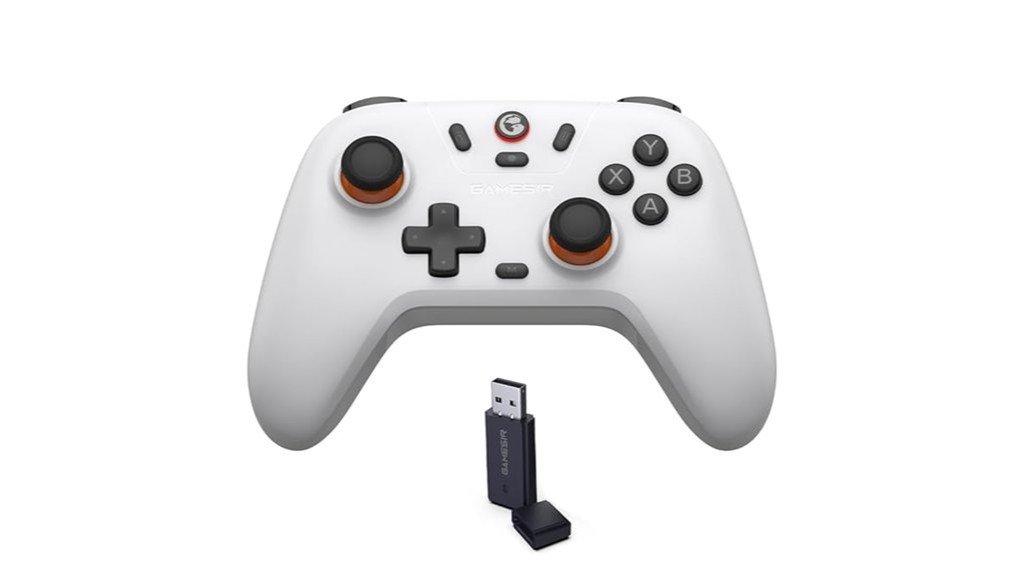
For budget-conscious gamers who prioritize precision over brand prestige, the GameSir Nova Lite Wireless Bluetooth Controller (White) stands out thanks to its rare Hall Effect analog sticks, which deliver low deadzone and anti-drift performance typically found in pricier pads. It offers tri-mode connectivity (Bluetooth, 2.4 GHz dongle, USB-C), multi-function M button for vibration, layout and deadzone tweaks, and 20 Hz turbo for multiple buttons. Build quality is solid with good haptics; included hard case and dongle aid portability. Compatibility spans PC, Steam, Switch, iOS and Android, though Bluetooth may present DS4 identification and occasional pairing quirks.
Best For: budget-conscious cross-platform gamers who want near-drift-free analog sticks and flexible connectivity (Bluetooth, 2.4 GHz dongle, USB-C) without paying premium for brand-name controllers.
Pros:
- Hall Effect sticks provide low deadzone, anti-drift performance and improved aiming precision uncommon at this price.
- Tri-mode connectivity plus included hard case and dongle make it versatile and travel-friendly for PC, Switch, mobile and Steam.
- Multi-function M button and 20 Hz turbo offer on-the-fly customization (vibration, layout, deadzone, turbo) for different games and preferences.
Cons:
- Bluetooth often identifies as a DualShock/DS4 profile on PC, requiring DS4Windows or the dongle for best legacy-game compatibility.
- Initial pairing can be confusing and may need firmware updates/downgrades or troubleshooting steps to stabilize connections.
- No USB-C charging cable included and some users report occasional hardware failures or less tactile button feel.
PowerA Battle Dragon Wireless Controller for PC and Cloud Gaming
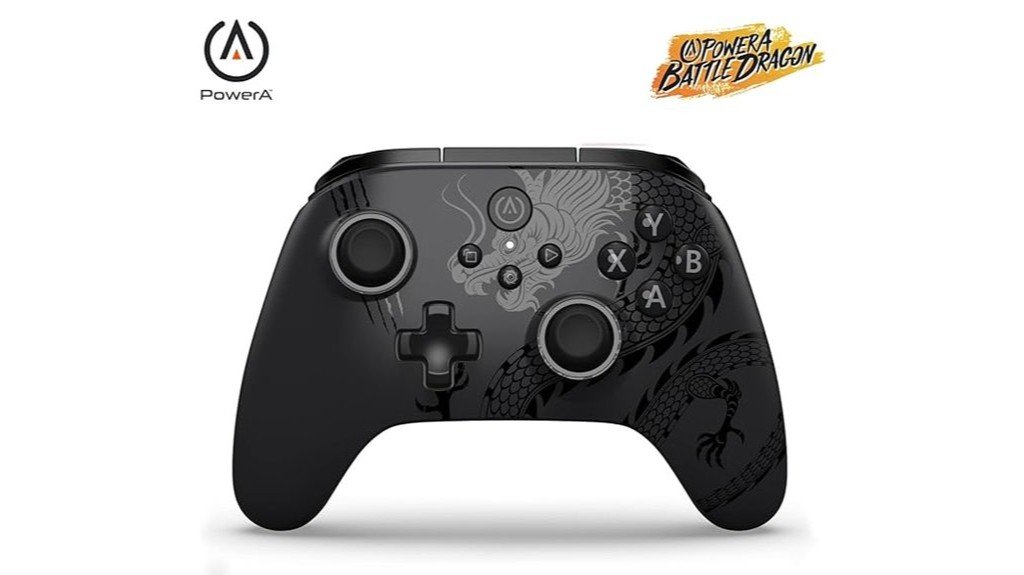
PowerA’s Battle Dragon Wireless Controller is best suited to PC and cloud gamers who want Hall Effect accuracy, adjustable trigger locks and rear mappable buttons without breaking the sub-₹3,000 budget. Designed for PC, cloud devices, Android and smart TVs (not iOS), it offers wired USB-C, 2.4 GHz dongle and Bluetooth (D-input limits). Magnetic Hall Effect sticks and triggers, 3-way trigger locks, four rear Advanced Buttons, turbo and textured grips are standout features. Rechargeable battery (~16–20 hrs), dual rumble motors and PowerA app customization add value, though stick drift, app quirks, X-input limits and occasional durability reports temper long-term confidence.
Best For: PC and cloud gamers on a budget who want Hall Effect sticks/triggers, adjustable trigger locks and rear mappable buttons for improved precision and customization (not compatible with iOS).
Pros:
- Hall Effect magnetic thumb sticks and triggers for improved accuracy and anti-drift design.
- Wired USB-C, 2.4 GHz dongle and Bluetooth options plus 4 rear Advanced Buttons, turbo and trigger locks for flexible play styles.
- Rechargeable battery with long runtime (~16–20 hrs), strong rumble and robust app customization (button mapping, deadzone, firmware updates).
Cons:
- Some users report measurable stick error/drift and occasional calibration/app quirks that may require firmware updates or workarounds.
- Bluetooth may operate in D-input only, causing compatibility issues with games that expect X-input (may need XOutput).
- Anecdotal long-term durability concerns (stick or button failures after ~12–14 months) and occasional uneven rumble motor intensity.
Cosmic Byte Stellaris Gaming Controller (WiFi, Bluetooth, Wired)
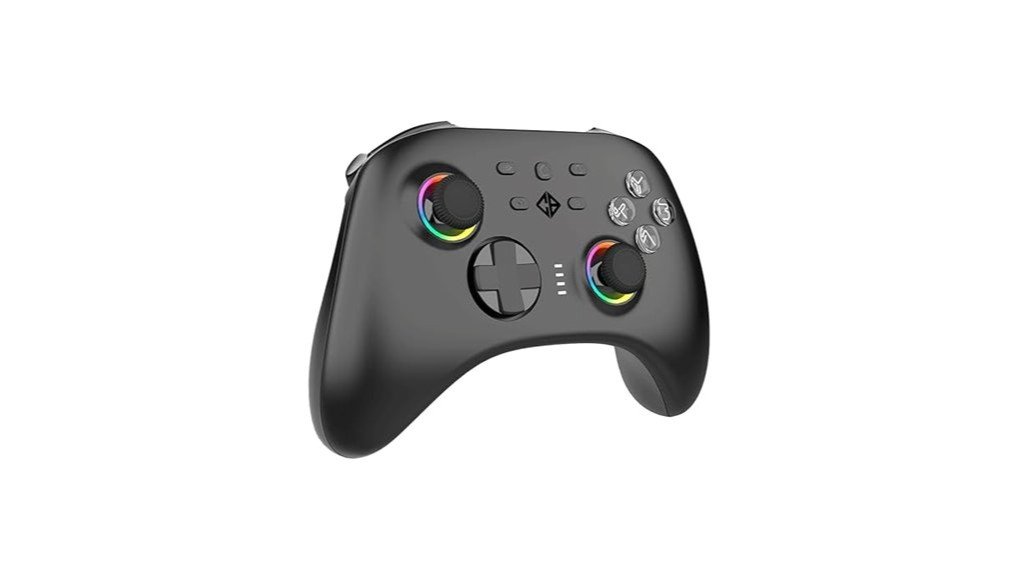
Targeted at budget-conscious gamers who want versatile connectivity and durable inputs, the Cosmic Byte Stellaris Controller pairs tri-mode support (2.4 GHz dongle, Bluetooth, and wired Type‑C) with Hall Effect triggers and joysticks for reduced drift and precise control. The matte black gamepad includes a 1000 mAh battery, 1000 Hz polling, vibration, RGB lighting, programmable macros and replaceable thumbsticks, plus a 2.4 GHz dongle, Type‑C cable and spare sticks. Compatible across PC, Mac, Android, iOS and Switch, it earns praise for value and responsiveness though some users report intermittent connectivity and occasional defects; one‑year warranty applies.
Best For: budget-conscious gamers seeking versatile tri-mode connectivity and durable, low-drift controls for PC, consoles and mobile devices.
Pros:
- Hall Effect triggers and joysticks provide precise, drift-resistant inputs and long-term durability.
- Tri-mode connectivity (2.4 GHz dongle, Bluetooth, wired Type‑C) plus 1000 Hz polling for low latency and broad platform compatibility.
- Good value bundle with 1000 mAh battery, vibration, RGB lighting, programmable macros and extra thumbsticks included.
Cons:
- Some users report intermittent dongle/connectivity issues and occasional inconsistent behavior.
- Isolated reports of cosmetic defects or faulty units and mixed experiences with customer support/returns.
- Battery capacity and feature set aimed at value segment—may lack premium build/refinements found in higher-end controllers.
EvoFox Elite X2 Wireless Gaming Controller for PC (Dual-Mode, Magnetic Hall Joysticks)
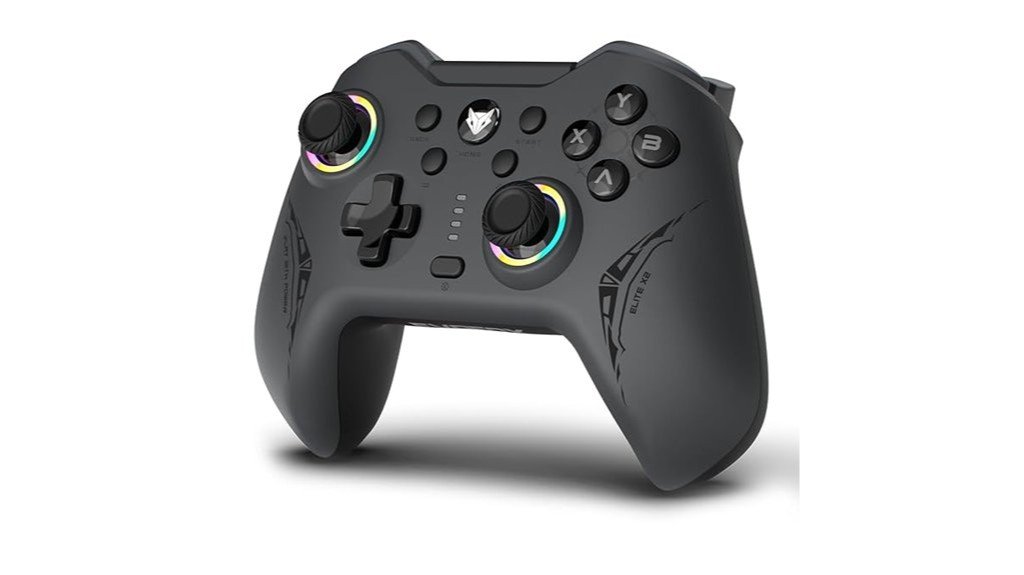
Who benefits most from the EvoFox Elite X2? Competitive budget gamers seeking responsive input and advanced sensors. The dual-mode grey controller offers 2.4 GHz wireless and wired USB-C with 1000 Hz polling. Hallsense magnetic Hall 3D joysticks and analog triggers promise drift-free, pressure-sensitive control; Precision Mode halves joystick sensitivity and Turbo/EZ Click macro buttons add customization. Dual vibration motors provide three intensity levels. Build is plastic with rubberized grips—comfortable though some report stiff grips or loose-feeling triggers. Users praise value and performance for FPS and racing; occasional compatibility quirks and isolated quality-control issues temper an otherwise strong budget offering.
Best For: Competitive budget gamers who want responsive, drift-resistant analog sticks and pressure-sensitive triggers with dual wireless/wired connectivity and customizable macro/turbo features.
Pros:
- Hallsense magnetic joysticks and analog triggers reduce drift and provide precise, pressure-sensitive control for FPS and racing games.
- Dual-mode connectivity (2.4 GHz wireless + wired USB-C) with 1000 Hz polling for low input lag and versatile use.
- Programmable EZ Click back buttons, Turbo mode, Precision Mode (0.5× sensitivity), and adjustable dual-motor vibration add customization and tactile feedback.
Cons:
- Occasional build-quality issues reported (stuck button, loose-feeling triggers, variable rubber grip comfort).
- Some users experience inconsistent wireless compatibility or need to use a USB cable on certain systems.
- Mixed reports on cross-platform compatibility (e.g., PS4, Apple TV, Google TV) — may require troubleshooting or not work perfectly everywhere.
Cosmic Byte Blitz Wireless and Wired Controller for PC (Black)
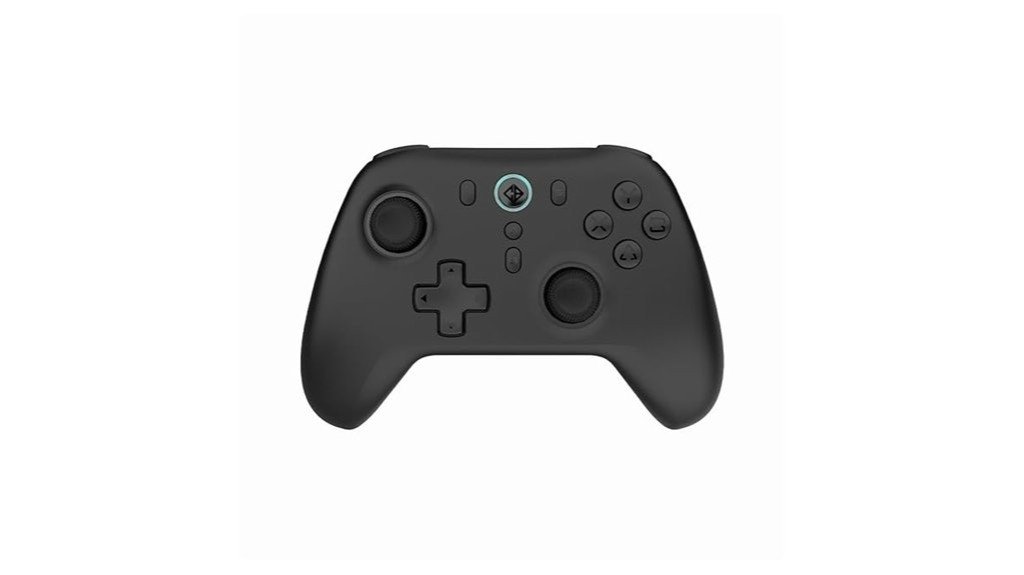
The Cosmic Byte Blitz Wireless + Wired Controller (Black) is ideal for budget-conscious PC gamers seeking pro-style responsiveness thanks to Hall Effect joysticks and triggers that reduce drift and improve precision. Sleek, 310 g build offers dual 2.4 GHz wireless (dongle) and USB wired modes with a 1000 Hz polling rate and reported sub‑second connection. Features include switchable 4/8‑way D‑pad, remappable stick/D‑pad functions, turbo/auto‑turbo, adjustable vibration and ~6–12 hour rechargeable battery life. Widely praised for ergonomics, tactile buttons and value under ₹2,100, it lacks Bluetooth and RGB; occasional stick roughness and mixed support reports are noted.
Best For: Budget-conscious PC gamers who want pro-style responsiveness and customization (Hall Effect sticks/triggers, remapping, turbo) in a wired or 2.4 GHz wireless gamepad without breaking the bank.
Pros:
- Hall Effect joysticks and triggers for reduced drift and improved precision.
- Dual wired (USB) and 2.4 GHz wireless with 1000 Hz polling and fast, stable connection.
- Switchable 4/8-way D-pad, remapping, turbo/auto-turbo and adjustable vibration for flexible gameplay.
Cons:
- No Bluetooth support (requires 2.4 GHz dongle) and no RGB lighting.
- Occasional isolated reports of left-stick sticking/roughness.
- Mixed experiences with customer support and some indicator visibility issues.
Factors to Consider When Choosing Gaming Controllers Under ₹3,000 for PC & Console
When choosing controllers under ₹3,000, buyers should weigh build quality and ergonomics to ensure comfort during long sessions and durable construction. Attention to sensor type and drift, along with connectivity options and platform compatibility, determines responsiveness and whether the pad works seamlessly with PC or console. Battery life, charging methods, and available customization software round out practical considerations for performance and personalization.
Build Quality & Ergonomics
In assessing build quality and ergonomics for controllers under ₹3,000, buyers should prioritize solid-feeling plastics, textured grips, and a reassuring weight (roughly 280–320 g) to minimize hand fatigue and improve hold during long sessions; attention to crisp tactile buttons, smooth low-play triggers, and magnetic/Hall Effect or high-quality potentiometer sticks further reduces drift and extends lifespan, while tight seams, flush buttons, and a sturdy USB-C port predict fewer hardware failures—finally, the controller’s shape must suit the user’s hand size so thumb reach and button placement avoid overextension. Consumers should test button travel and trigger play where possible, verify stick smoothness without excessive looseness, and choose profiles that match hand dimensions; durable finishes and solid assembly indicate longer service life.
Sensor Type & Drift
Following assessment of build and ergonomics, sensor choice becomes a primary determinant of long-term controller performance, especially regarding stick drift and aiming precision. Magnetic Hall Effect joysticks and triggers use non-contact sensing, delivering near-zero drift and far greater longevity compared with potentiometer (resistive) sticks, which are cheaper but prone to gradual drift and larger deadzones. Buyers should seek stated deadzone values or adjustable deadzone settings—lower deadzones (under 2–5%) improve responsiveness but can expose minor sensor noise if filtering is weak. Firmware-update support and in-controller calibration matter because software fixes can correct center offsets without hardware replacement. Finally, user-reported drift rates or measured error percentages provide practical evidence; community-tested low-error controllers or those with magnetic sensors are preferable for long-term stability.
Connectivity & Compatibility
Why does connectivity matter as much as build quality? Connectivity determines responsiveness and whether a controller will work with chosen devices. Buyers should check available modes — wired USB‑C for lowest latency, 2.4 GHz dongles for broad PC compatibility, and Bluetooth for phone and TV convenience. Confirm controller identification (XInput, DInput, DualShock/DS4): many PC titles expect XInput and non‑XInput units often need middleware or mapping tools. Prefer tri‑mode or multi‑mode support when using one pad across PC, Android, Switch or smart TV to avoid adapters. Verify pairing and mode‑switching steps and whether a dongle is supplied, since profiles can change button mapping and rumble. Finally, note platform quirks: some OSes or services accept only wired or authenticated dongle connections.
Battery Life & Charging
Connectivity choices affect how often a controller needs charging and which charging methods are practical for the user. Controllers with 400–1000 mAh batteries typically deliver roughly 8–20 hours of play depending on vibration, wireless mode, and polling rate. Preference should be given to rechargeable lithium‑ion/polymer packs with USB‑C for faster, universal charging; proprietary magnetic chargers or removable AAs can reduce convenience or runtime. Bluetooth often offers better power efficiency than 2.4 GHz dongles but may trade off features or polling fidelity; wired play or dongle use can lower or eliminate battery drain. Buyers should confirm passthrough charging support and clear battery indicators (LED or software). Finally, treat manufacturer “up to” figures cautiously—vibration, LEDs, and high polling rates shorten real-world endurance.
Customization & Software
Often overlooked, a controller’s customization software can be as important as its hardware because it determines how well inputs can be tuned and adapted across games and platforms. Buyers should prioritize companion apps that offer button remapping, deadzone adjustment and trigger sensitivity to tailor responses by genre and to compensate for minor drift. Confirm support for saving multiple profiles (local or cloud) and quick on-controller profile switching to move between PC, emulator and console setups without repeated configuration. Check for firmware updates and calibration routines—joystick/trigger calibration and vibration tuning—to resolve compatibility issues and extend device life. Verify the app supports needed advanced features (programmable back/trigger buttons, turbo, macros) and note any limits. Prefer software compatible with Windows and Android or with clear third‑party guidance.
Buttons, Triggers & Macros
How should buttons, triggers and macros be weighed when choosing a budget controller? Buyers should inspect trigger type and sensitivity: pressure-sensitive or Hall-effect analog triggers deliver variable input for braking or gradual aiming, while digital triggers are simple on/off switches. Button actuation and feel matter: tactile mechanical-style microswitches provide crisper, more consistent feedback and faster response than softer membrane pads. Programmable inputs improve ergonomics; controllers with at least two remappable rear or paddle buttons allow common actions without finger repositioning. Turbo and macro capabilities add utility—look for user-adjustable turbo (around 20 Hz) and onboard macro recording so sequences persist without PC software. Finally, deadzone and button-sensitivity adjustments, via onboard controls or companion apps, help eliminate accidental inputs and tailor responsiveness across genres.
Conclusion
In summary, these five controllers deliver exceptional precision and value under ₹3,000, combining Hall Effect sticks or low‑drift sensors, responsive 1000 Hz polling, and versatile connectivity for PC, Android and consoles. Each offers remappable buttons, turbo/macro features, adjustable vibration and spare parts support, though occasional firmware or pairing quirks may arise. For budget‑minded gamers seeking near‑zero drift and competitive performance, they represent the strongest choices without sacrificing ergonomics or essential features.