Budget shoppers in India can still find gaming mice that deliver responsive sensors, decent build quality, and useful features without overspending. The list focuses on reliable models that balance performance and ergonomics within a ₹1,500 limit. Each pick targets a specific need — lightweight flicks, ergonomic comfort, programmable buttons — and offers practical trade-offs worth considering before making a choice.
- Kreo Gaming Mouse with Programmable Buttons & RGB Lighting (Black, Hawk)
- Corsair Katar Pro Ultra-Light Optical USB Gaming Mouse (Black)
- Logitech G102 USB Light Sync Gaming Mouse (Black)
- Razer DeathAdder Essential Wired Ergonomic Gaming Mouse (White)
- Cosmic Byte Raptor Dual Mode RGB Gaming Mouse (Black)
- Factors to Consider When Choosing a Gaming Mouse Under ₹1,500 in India
- Sensor Accuracy & DPI
- Build Quality & Durability
- Button Layout & Macros
- Comfort & Grip Style
- Software & Customization
- Conclusion
Kreo Gaming Mouse with Programmable Buttons & RGB Lighting (Black, Hawk)
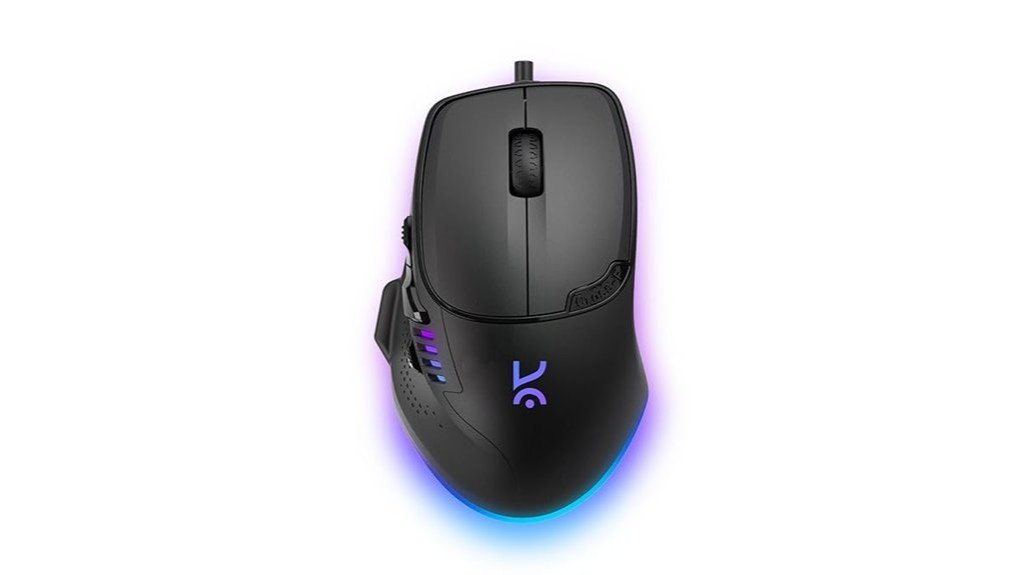
The Kreo Gaming Mouse (Black, Hawk) is best suited for budget-conscious PC gamers who frequently seek programmable controls and customizable RGB without sacrificing responsiveness, offering a lightweight ambidextrous design, adjustable Pixart optical DPI, and up to 1000 Hz polling for competitive play. Kreo’s wired mouse weighs 58 g, has eight tactile buttons, and supports macro programming, drag/butterfly clicking and multiple RGB zones with 13 modes. Its matte finish and palm-friendly shape suit ~18 cm hands, though a small thumb-rest may feel awkward. Reviews note strong value and tracking; occasional software bugs, rare early failures, and modest packaging close the trade-offs.
Best For: Budget-conscious PC gamers who want programmable buttons and customizable RGB in a lightweight, responsive wired mouse for competitive play.
Pros:
- Lightweight ambidextrous design (58 g) with adjustable Pixart optical DPI and up to 1000 Hz polling for accurate, responsive tracking.
- Eight tactile programmable buttons, macro support, and proven drag/butterfly clicking performance for gaming versatility.
- Multiple RGB zones (13 modes) and solid build with a matte finish offering strong value for the price.
Cons:
- Occasional software bugs and minor firmware issues (including a known lighting bug) that may require workarounds or updates.
- Some reports of early hardware failures (~2 months) and inconsistent customer support experiences.
- Small thumb-rest may be uncomfortable for some users; manual/packaging is minimal.
Corsair Katar Pro Ultra-Light Optical USB Gaming Mouse (Black)
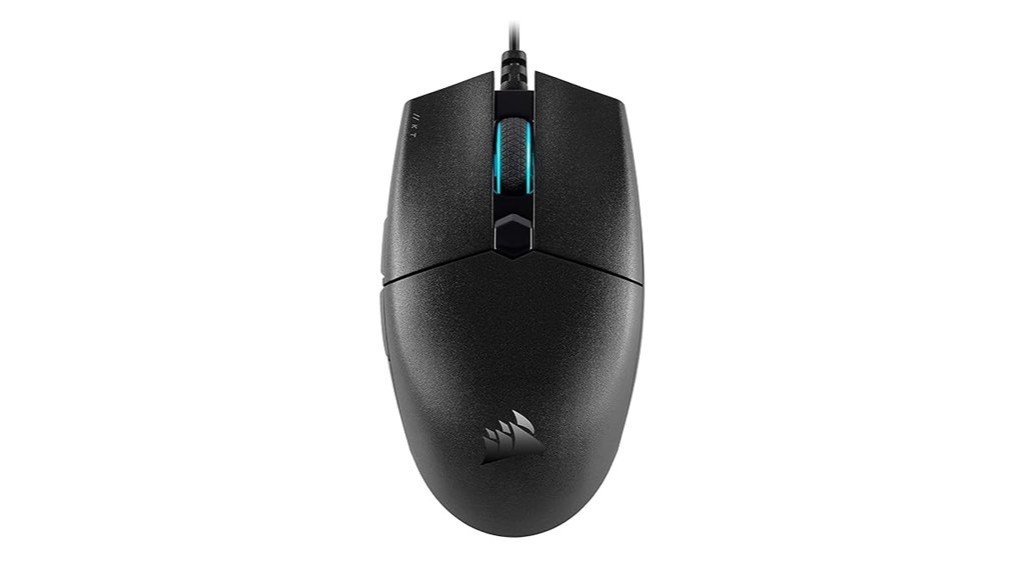
Designed for lightweight, low-sensitivity play, the Corsair Katar Pro Ultra-Light suits competitive FPS and MOBA players who favor fast flicks and fingertip or claw grips. Weighing 69 g with a compact ambidextrous body, it uses a custom PixArt optical sensor up to 12,400 DPI, three on-the-fly DPI presets and six programmable buttons. Large PTFE-style feet and a long non-braided USB cable provide smooth glide and plug-and-play convenience; CORSAIR iCUE enables surface calibration, macros and RGB tuning. Reviewers praise precision and value but note occasional double-click issues, basic build feel and mixed warranty experiences—best bought on sale.
Best For: Competitive FPS and MOBA players who prefer an ultra-light, ambidextrous mouse for low-sensitivity, fast flicks using claw or fingertip grips.
Pros:
- Lightweight 69 g ambidextrous design with PixArt optical sensor (up to 12,400 DPI) for precise, responsive tracking.
- Six programmable buttons and CORSAIR iCUE support for macros, surface calibration, and customizable RGB.
- Smooth glide thanks to large PTFE-style feet and strong value for price.
Cons:
- Occasional reports of double-click/chattering failures and a somewhat basic build feel.
- Non-braided cable may affect long-term durability for heavy use.
- Warranty/support experiences are mixed and can be difficult for some users.
Logitech G102 USB Light Sync Gaming Mouse (Black)
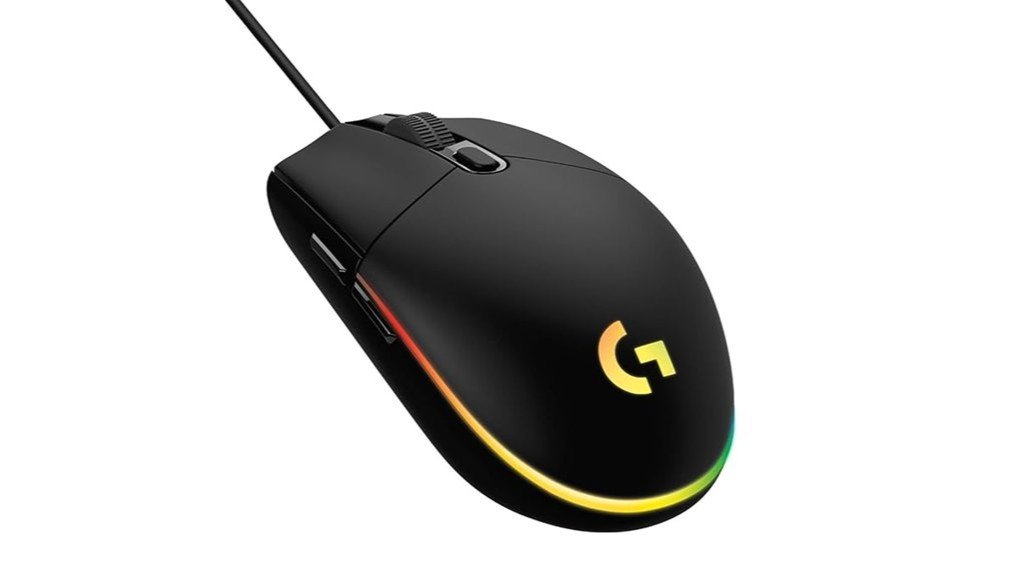
Well-suited for budget-conscious FPS players seeking accurate tracking and RGB flair, the Logitech G102 USB Light Sync Gaming Mouse (Black) pairs an 8,000 DPI gaming-grade sensor with LIGHTSYNC RGB customization. The wired compact design (≈89 g) and classic G203-style shape suits small-to-medium hands and fast flicks, offering up to five configurable DPI stages and high IPS tracking. Six programmable buttons, metal-spring tensioning and Logitech G HUB support macros and lighting across 16.8 million colors. A thin 2.1 m cable reduces drag but may affect longevity. Generally praised for value and sensor performance; occasional long-term button wear reported, covered by a two-year warranty.
Best For: Budget-conscious FPS players who want accurate tracking, a lightweight wired shape for fast flicks, and customizable LIGHTSYNC RGB without breaking the bank.
Pros:
- Affordable with strong sensor performance (up to 8,000 DPI) and high IPS suitable for fast aiming.
- Lightweight (~89 g) and compact G203-style shape comfortable for small-to-medium hands and FPS play.
- LIGHTSYNC RGB and programmable buttons via Logitech G HUB offer extensive customization and macros.
Cons:
- Thin unbraided cable may reduce long-term durability and feels less premium.
- Some users report long-term button wear or double-click issues after extended use.
- Matte finish can show cosmetic wear over time (turning glossy) and side-button placement may not suit everyone.
Razer DeathAdder Essential Wired Ergonomic Gaming Mouse (White)
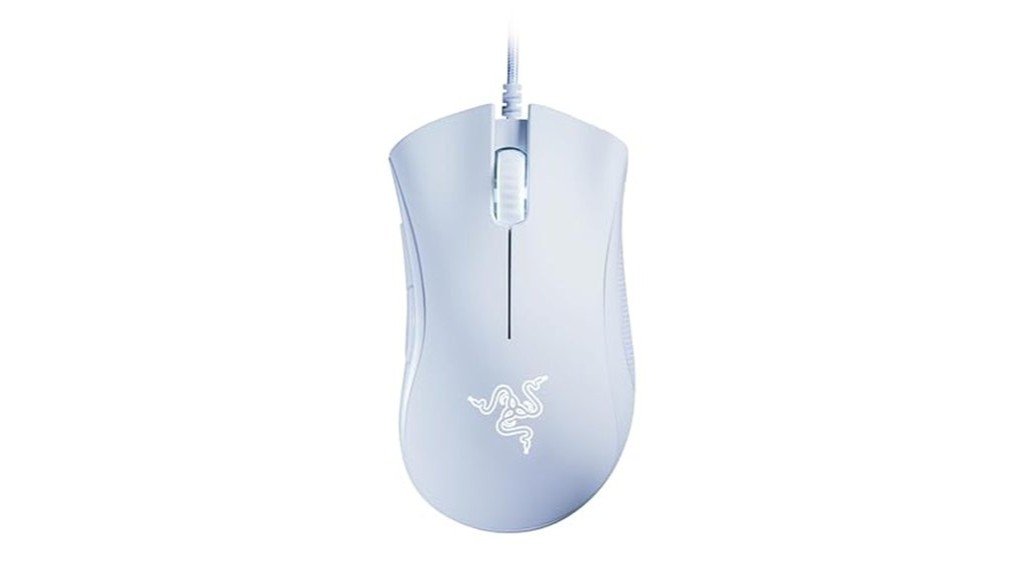
Offering ergonomic comfort and reliable tracking at an entry-level price, the Razer DeathAdder Essential White appeals to gamers seeking a straightforward wired mouse with a 6,400 DPI optical sensor and five programmable buttons. The DeathAdder Essential (RZ01-03850200-R3M1) is a 96 g, corded ergonomic mouse with tactile rubberized scroll, mechanical switches rated to 10 million clicks, and on-the-fly DPI adjustment. It supports remapping and macros via Razer Synapse, ships with a two-year warranty, and targets PC/laptop users. Users praise comfort, tracking and value; criticism notes occasional USB detection issues and scroll-wheel durability after extended use.
Best For: Gamers on a budget who want an ergonomic, reliable wired mouse with solid tracking and programmable buttons for PC/Laptop use.
Pros:
- Affordable entry-level price with strong value and comfortable ergonomic design.
- 6,400 DPI optical sensor, on-the-fly DPI adjustment, and 5 programmable buttons with Razer Synapse support.
- Mechanical switches rated to 10 million clicks and a tactile rubberized scroll wheel for good control.
Cons:
- Some users report intermittent USB detection/connection issues.
- Scroll wheel durability concerns after extended use reported by several reviewers.
- DPI ceiling (6,400) may be limiting for high-end competitive players.
Cosmic Byte Raptor Dual Mode RGB Gaming Mouse (Black)
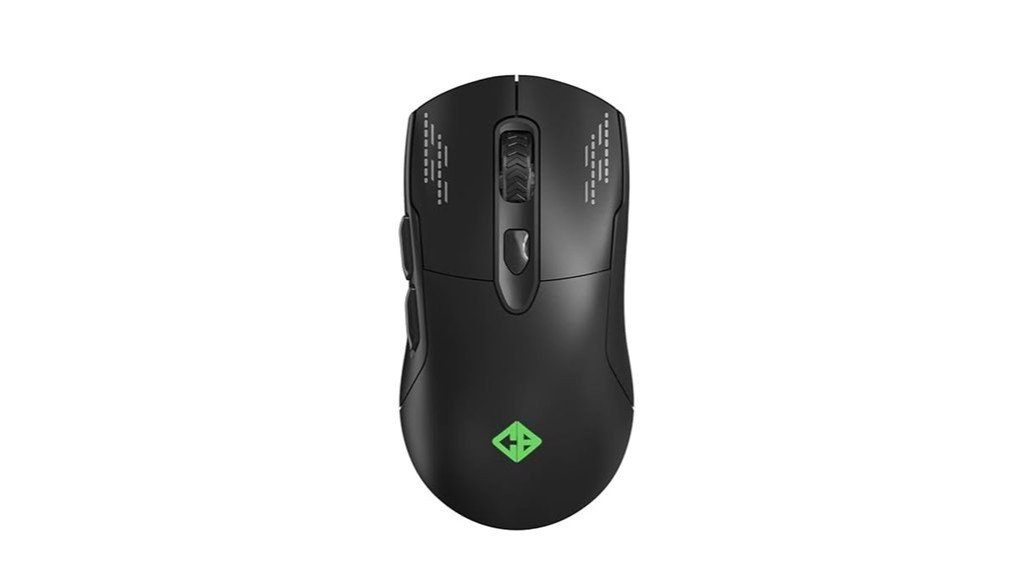
The Cosmic Byte Raptor Dual Mode RGB Mouse (Black) is best for budget-conscious PC gamers who want both wired reliability and wireless freedom, thanks to its dual-mode connectivity and up to 25 hours of battery life. It uses a Pixart 3212 sensor with up to 4800 DPI, 500 Hz polling, and 10 million-click switches. The 96 g body, ergonomic shape and PTFE feet balance comfort and glide; braided cable aids wired durability. Eleven RGB effects are customizable though software is absent. Users praise build, battery and responsiveness but note no Bluetooth, mixed after-sales, and occasional power button quality concerns.
Best For: budget-conscious PC gamers who want both wired reliability and wireless freedom with solid battery life and responsive performance.
Pros:
- Dual-mode connectivity (wired + wireless) with up to 25 hours battery life and braided cable for durability.
- Pixart 3212 sensor (up to 4800 DPI) with 500 Hz polling and 10 million-click switches for reliable gaming performance.
- Ergonomic 96 g design with PTFE feet for smooth glide and 11 customizable RGB effects.
Cons:
- No Bluetooth and no dedicated software for deeper customization.
- Some users report power button quality concerns and mixed after-sales/warranty experiences.
- At ~90–96 g, may feel heavy for ultra-fast FPS “sniper” play; wired use can add perceived weight.
Factors to Consider When Choosing a Gaming Mouse Under ₹1,500 in India
When selecting a gaming mouse under ₹1,500 in India, attention should be paid to sensor accuracy and DPI for precise tracking and responsiveness. Equally important are build quality, button layout with programmable macros, and comfort suited to the user’s grip style. Software and customization options can tie these factors together by allowing sensitivity, lighting, and macro profiles to be tailored to playstyle.
Sensor Accuracy & DPI
How precisely a mouse tracks motion and translates small hand movements into cursor movement determines its suitability for competitive play. Buyers should prioritize an optical sensor with adjustable DPI—commonly 800–12,400 DPI in budget models—so in-game sensitivity can be matched without interpolation artifacts. Tracking accuracy hinges on sensor quality and IPS; aim for sensors that handle 200–300+ IPS to avoid loss during fast flicks. True polling rate and latency matter: 1000 Hz reduces input lag versus 125 Hz, improving responsiveness. Avoid marketing that touts extreme DPI without specifying sensor family or native resolution, since software scaling can cause jitter and poor precision. Finally, check lift-off distance and surface compatibility—many optical sensors perform best on cloth pads—because inconsistent calibration degrades small-movement control.
Build Quality & Durability
In assessing build quality and durability for gaming mice under ₹1,500 in India, buyers should inspect shell material and finish, switch ratings, cable construction, internal assembly, and serviceability—each factor directly affects longevity and day-to-day reliability. ABS shells with textured or matte coatings resist sweat and glossy wear far better than shiny finishes that show grease and polish within months. Main buttons rated around 10–20 million clicks and quality PTFE feet reduce abrasion and preserve glide. Braided or well-sheathed USB cables with reinforced strain relief at the mouse end minimize fraying and internal breaks. Mechanical integrity—solid mounting points, minimal creaks, and snug scroll/side assemblies—indicates fewer failure points. A clear warranty and accessible, replaceable parts significantly improve long-term ownership versus sealed units.
Button Layout & Macros
A clear button layout and reliable macro support determine how effectively a sub-₹1,500 gaming mouse adapts to different grips and workflows. Buyers should check number and placement of extra buttons (typically 2–8) to ensure side and DPI buttons are reachable without altering grip, especially for claw or palm styles. Macro capability matters: verify fully programmable macros (multi-key sequences, delays, loops) and whether they save onboard or only in PC software. Onboard memory lets mappings persist across systems. Software should be intuitive — drag‑and‑drop assignment, per‑profile switching, and binding of media keys, DPI shifts, or rapid‑fire enable quick customization. Finally, tactile differentiation between side and primary buttons prevents misclicks and supports consistent muscle memory during fast play.
Comfort & Grip Style
For optimal comfort, buyers should match mouse size and shape to hand length and grip style. Measure wrist-to-fingertip: small (<17 cm) suits fingertip/claw grips, medium (17–19 cm) fits claw/palm mixes, and large (>19 cm) supports full palm. Identify preferred grip—palm, claw, or fingertip—and select a shape that supports corresponding contact points to reduce fatigue. Prioritize ergonomic contours or subtle thumb and pinky rests for frequent palm or claw use to relieve pressure during long sessions. Consider weight and balance: sub-80 g mice favor fast flicks for fingertip/claw players, while heavier designs aid stability and tracking for palm users. Finally, check surface texture and side-button spacing; grippy matte finishes and well-placed tactile side buttons improve control and prevent accidental presses.
Software & Customization
Why check a mouse’s software before buying? Buyers should confirm customizable DPI stages and on-the-fly DPI switching, ideally 3–5 presets, to adapt sensitivity per game. The utility must support programmable buttons and macro assignment, including multi-step macro recording and per-profile key bindings. RGB customization—zones, colors, effects—matters when aesthetics or signaling are desired, and saving lighting plus performance profiles to onboard memory ensures features work without the PC app. Verify compatibility with the user’s OS and that the vendor issues updates; buggy or unsupported software can block polling rate adjustment, surface calibration, or macro editing. Prefer configuration tools that save multiple profiles, allow hotkey or automatic application-based switching, and offer profile export/import for backup or transfer.
Conclusion
Budget-conscious gamers can find capable mice under ₹1,500 that still deliver responsive performance for competitive play. The listed picks balance sensor reliability, ergonomics, and durable switches while offering useful features like adjustable DPI, RGB, and programmable buttons. Prioritizing low latency, comfortable grip, and solid build quality helps ensure longevity and accuracy. With reasonable warranty support and software for customization, these models represent practical, high-value choices for everyday gaming without overspending.